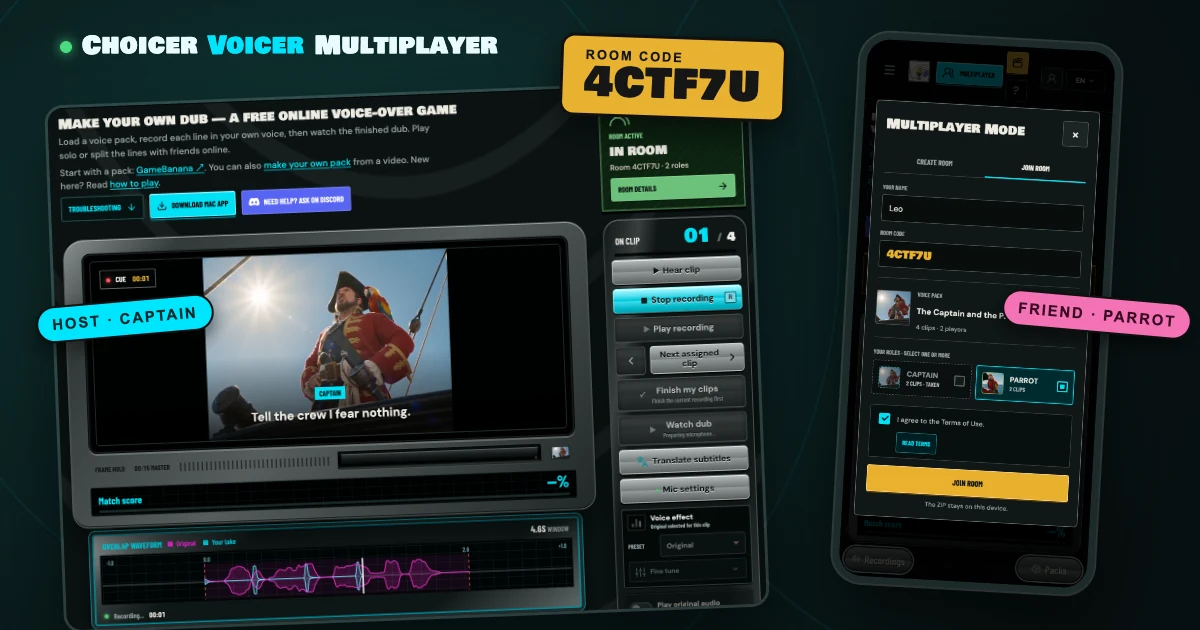
Dub a scene with friends in Choicer Voicer. Pick a character, record your lines and watch the finished video together.
- Free: join unlimited rooms; host one free room a day.
- No download: open thechoicervoicer.app on your phone or computer.
- 2+ players: each person can voice one or more characters.
Step 1: Get a voice pack and send the same ZIP to everyone
A voice pack is a ZIP with the scene's video, its lines and who says each one. You need one before you can open a room:
- Download a free community pack from GameBanana.
- Or make one from any video with the Dub Pack Maker. Our dub pack tutorial shows how in five steps.
The room never uploads the pack, so the host sends the ZIP to every player first, over Discord, Google Drive, AirDrop or anything else. It has to be the same file: a pack with a different number of clips is refused with Pack ZIP needed.
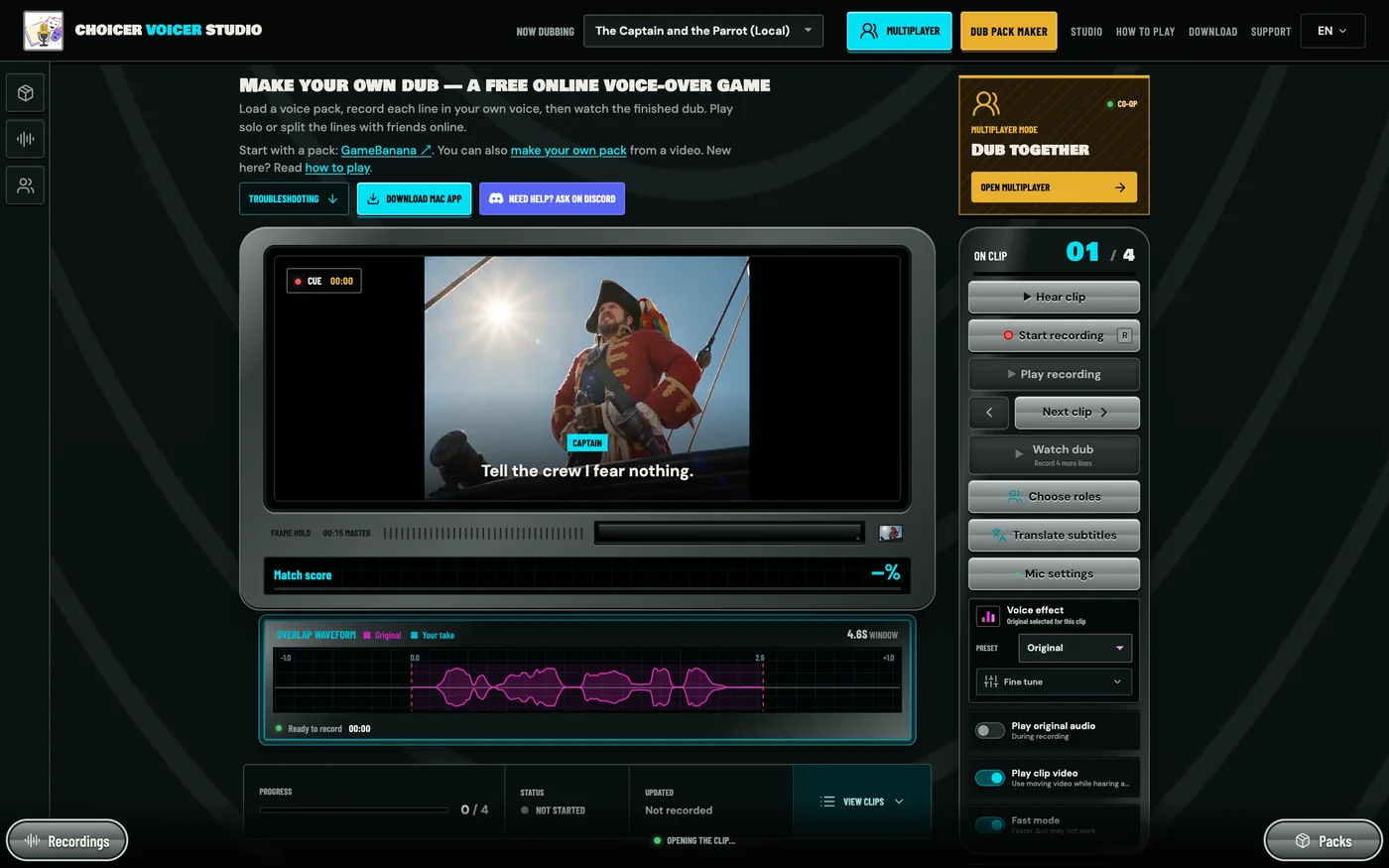
Each character in the pack becomes one role in the room. The screenshots in this guide use the pirate pack from that tutorial, with 4 clips and 2 roles: Maya hosts on a laptop and voices the Captain, Leo joins on his phone and voices the Parrot.
Step 2: Open Multiplayer
Go to thechoicervoicer.app and press Multiplayer in the top bar, or Open multiplayer on the Dub together card. Sign in if prompted.
Step 3: Create a room and choose your role
The dialog opens on the Create room tab. Fill it in from top to bottom:
- Your name. Up to 24 characters. This is what the other players see.
- Voice pack. Pick the pack from the list, or press Import ZIP to add it now.
- Your roles. Tick the character you want to voice. You can tick more than one.
- Terms. Tick I agree to the Terms of Use.
- Press Create room.
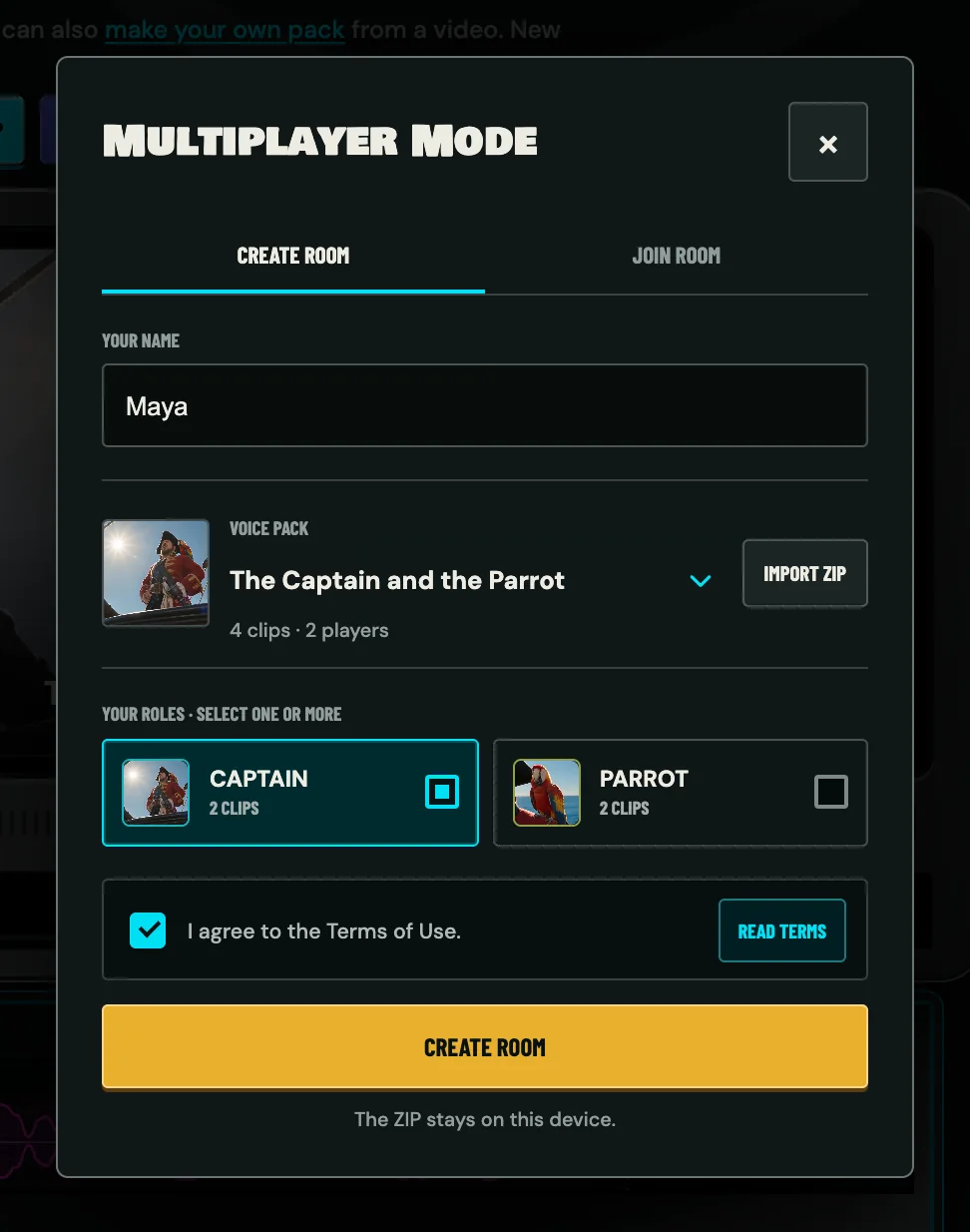
Each role shows how many clips it has, so you can see who gets the most lines before you choose. In our pack the Captain and the Parrot have two clips each.
Step 4: Invite friends with a link or a room code
The room opens with a six-character room code. Ours is 4CTF7U. Below it are two buttons:
- Copy invite link copies a link that opens the Studio with the room code already filled in. This is the easier one. Paste it wherever your group talks, and keep that chat or call open, because rooms have no chat of their own.
- Copy code copies just the code, for friends who would rather type it.
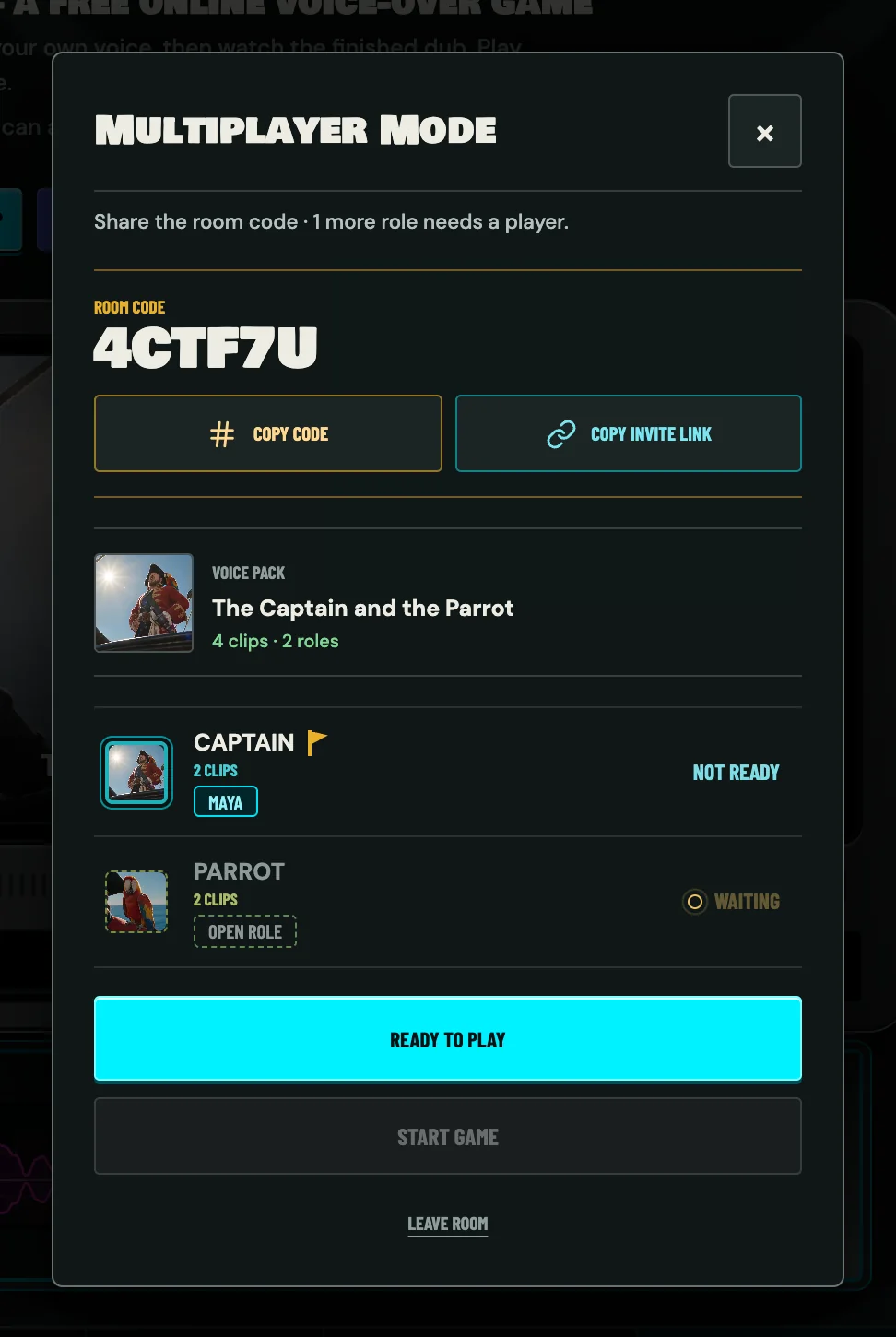
The line at the top says what the room is still waiting for, such as Share the room code · 1 more role needs a player. A role nobody has claimed is marked Open role, and the yellow flag marks the host.
Step 5: Join a room and pick a role
This step is for the guests. It works the same on a phone as on a computer.
- Open the invite link on your own device.
- Import the pack ZIP the host sent you, if it is not on this device yet.
- Enter your name and tick a free role. Roles marked Taken cannot be selected.
- Tick I agree to the Terms of Use and press Join room.
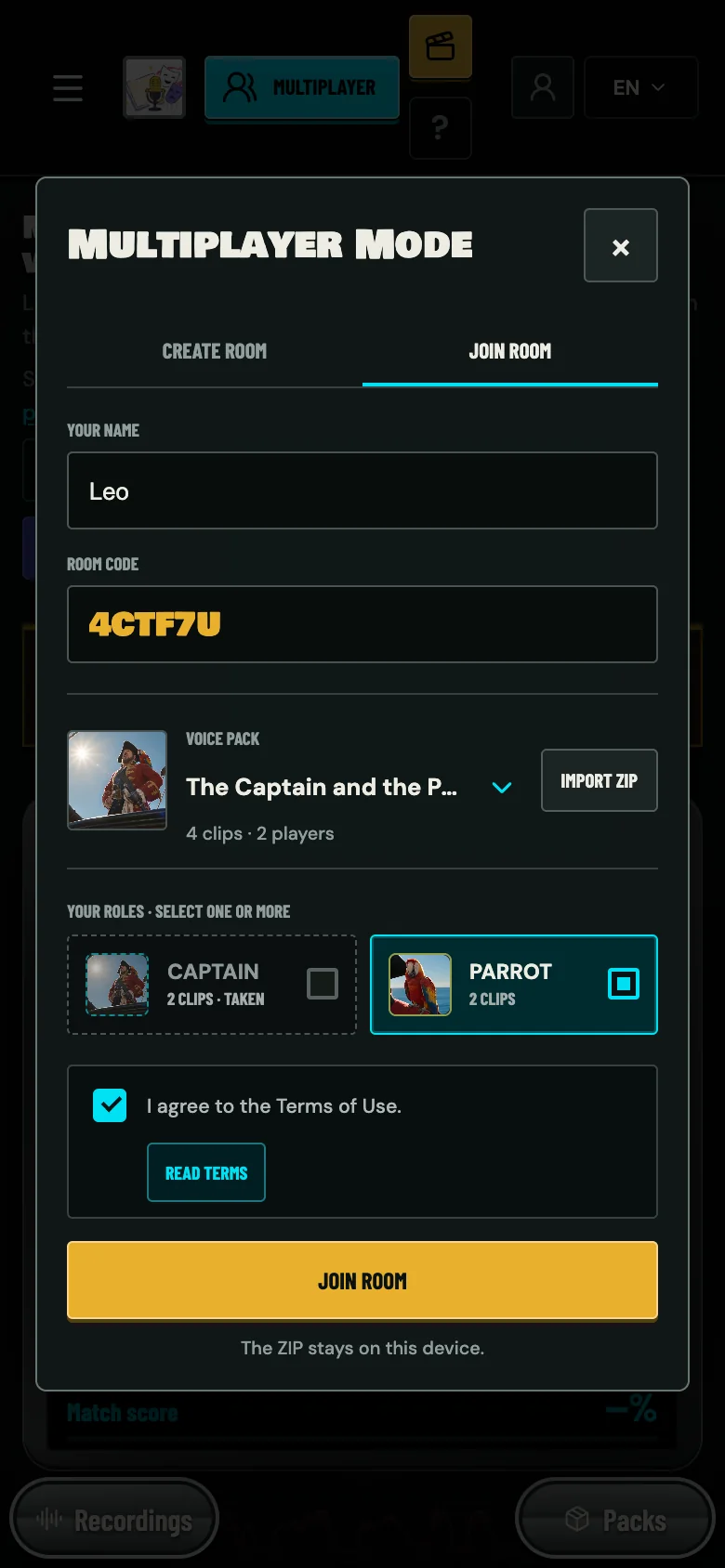
No link? Press Multiplayer, switch to the Join room tab and type the six-character code.
Step 6: Ready up and start the game
Everyone presses Ready to play. The button turns green and reads Ready ✓, and the room list shows who is ready. Once every role has a player and every player is ready, the host's Start game button lights up. The host presses it and the game begins on every device at once.
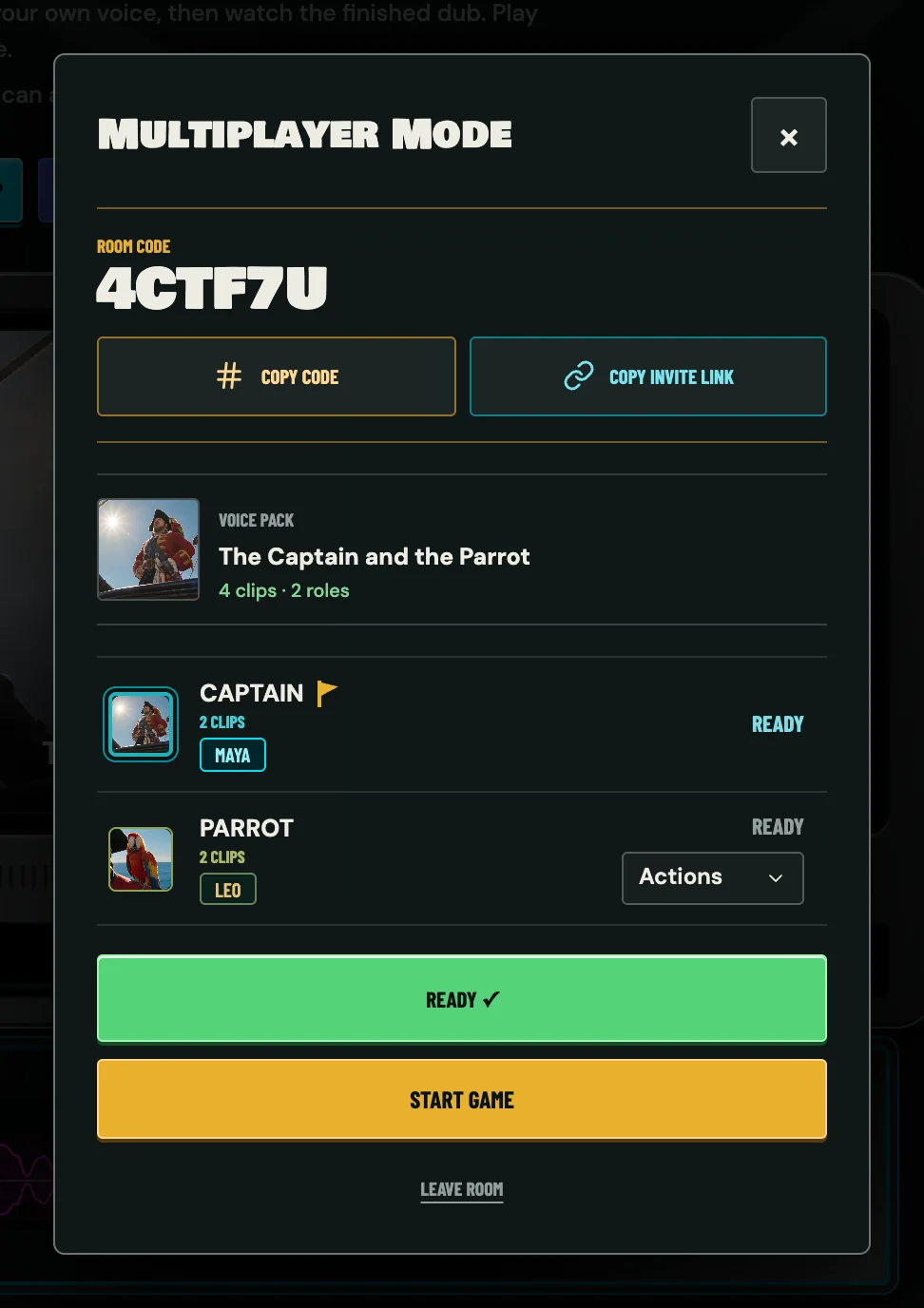
The host also gets an Actions menu next to each guest. It can remove a player from the room, which frees their roles straight away. Any player can use the same menu to report someone, or to block a player, which hides their name in your own browser.
Step 7: Record your lines
The top bar now shows In room with your room code, and the Studio takes you to your first line. You only record your own character. Lines that belong to other players are skipped. Put headphones on first, or the original audio leaks into your take. The microphone built into a laptop or phone is enough.
- Hear clip plays the original line so you can catch the timing.
- Start recording, or the R key, records your take. It stops by itself when the line's time is up.
- Play recording plays your take back. Record again replaces it. There is no limit on retries.
- Next assigned clip jumps to your next line.
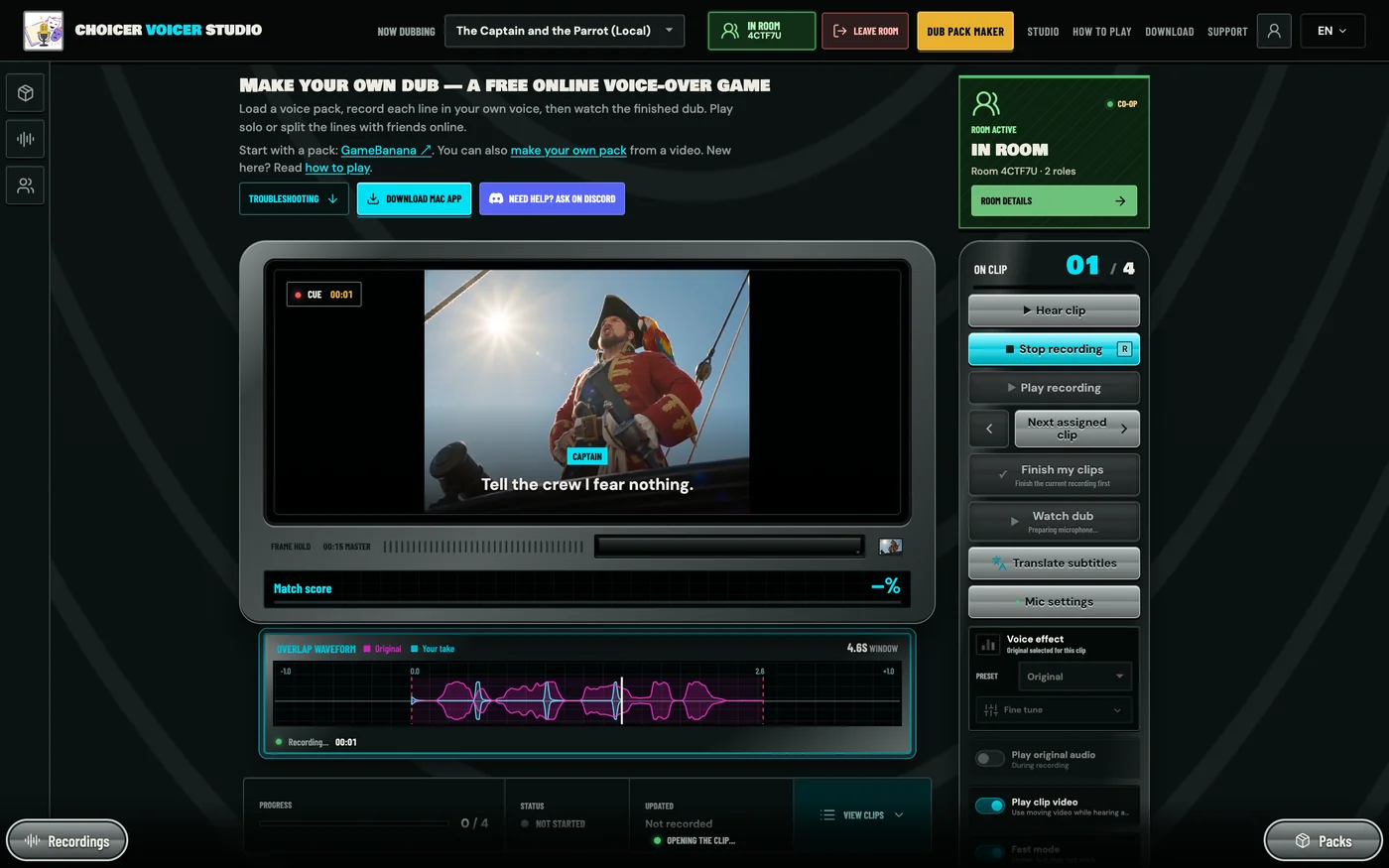
The overlap waveform under the screen draws your take over the original, which makes it easy to see whether you came in late. Voice effects work in a room too, so you can pitch your character up or down before you share the take. Each take is uploaded to the room in the background while you carry on.
When every one of your lines has a take, Finish my clips turns green. Press it to share your latest takes and tell the room you are done.
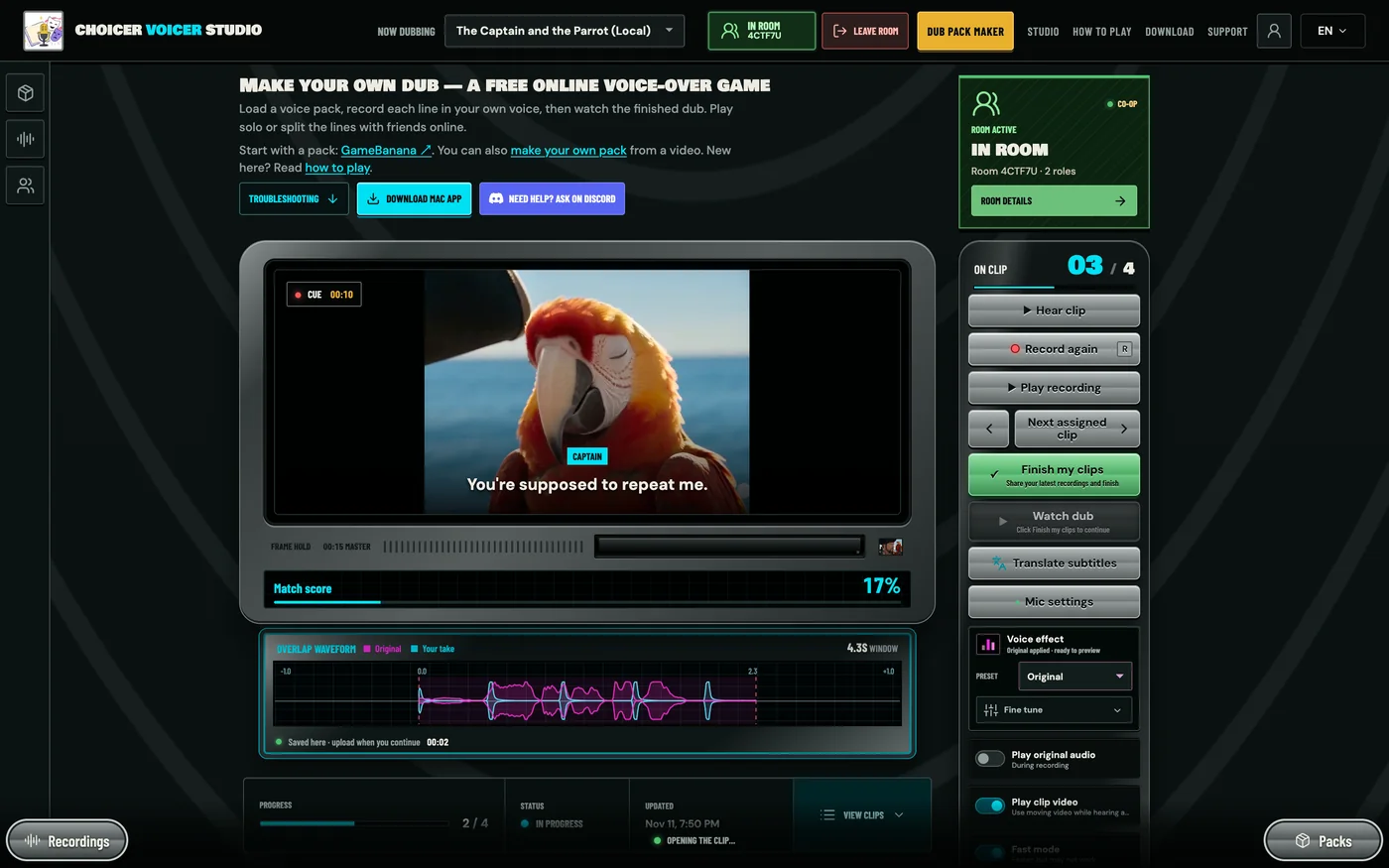
Step 8: Watch and export the finished dub
After Finish my clips you land in the waiting room. It lists every role with its progress, so you can see who is still recording. Keep the tab open. If you want to fix a line while you wait, press Review / re-record.
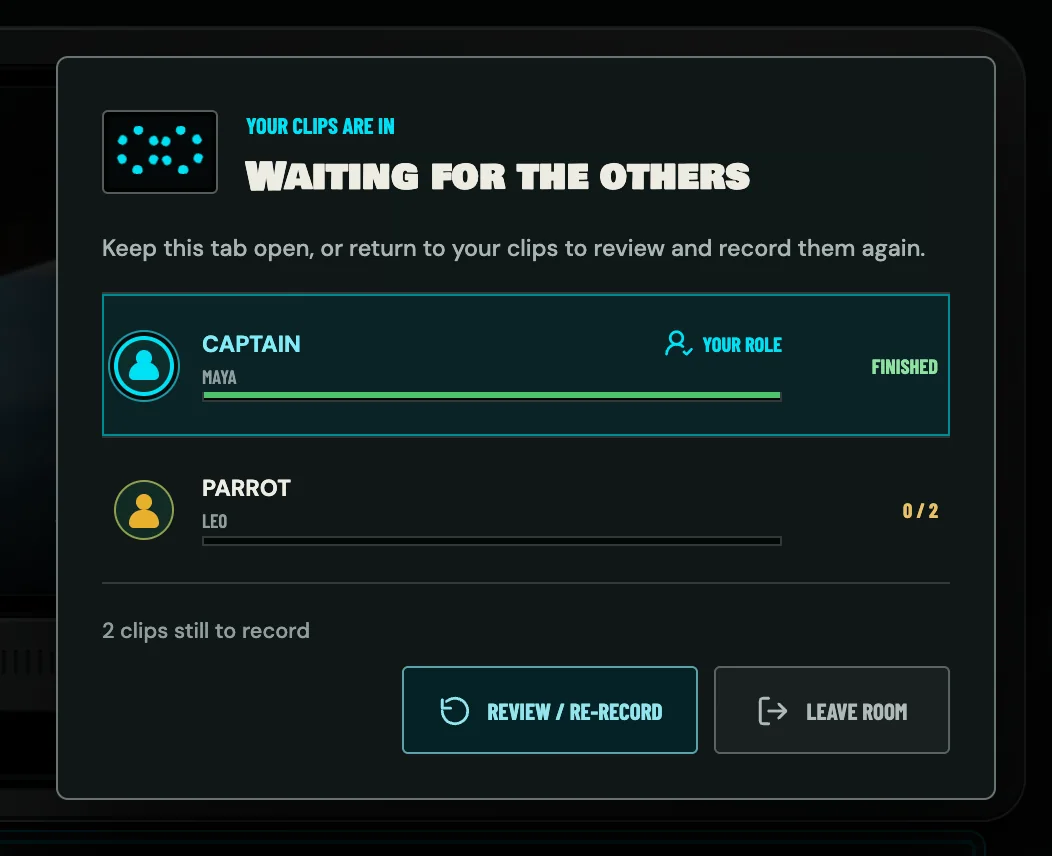
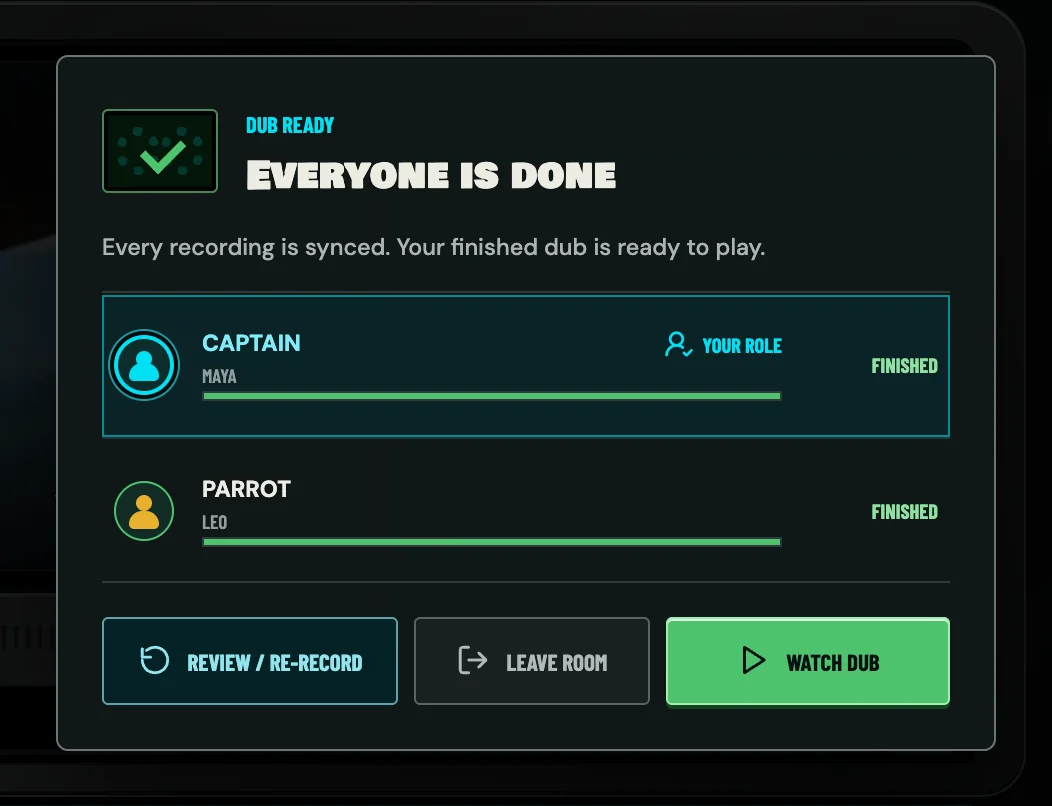
When the last player finishes and every recording has synced, the title changes to Everyone is done and a Watch dub button appears.
Watch dub plays the whole scene with each player's voice in place, mixed over the pack's backing track. The slider sets how loud the backing track is, Replay starts it again, and Export video saves the dub as a video file you can post or send.
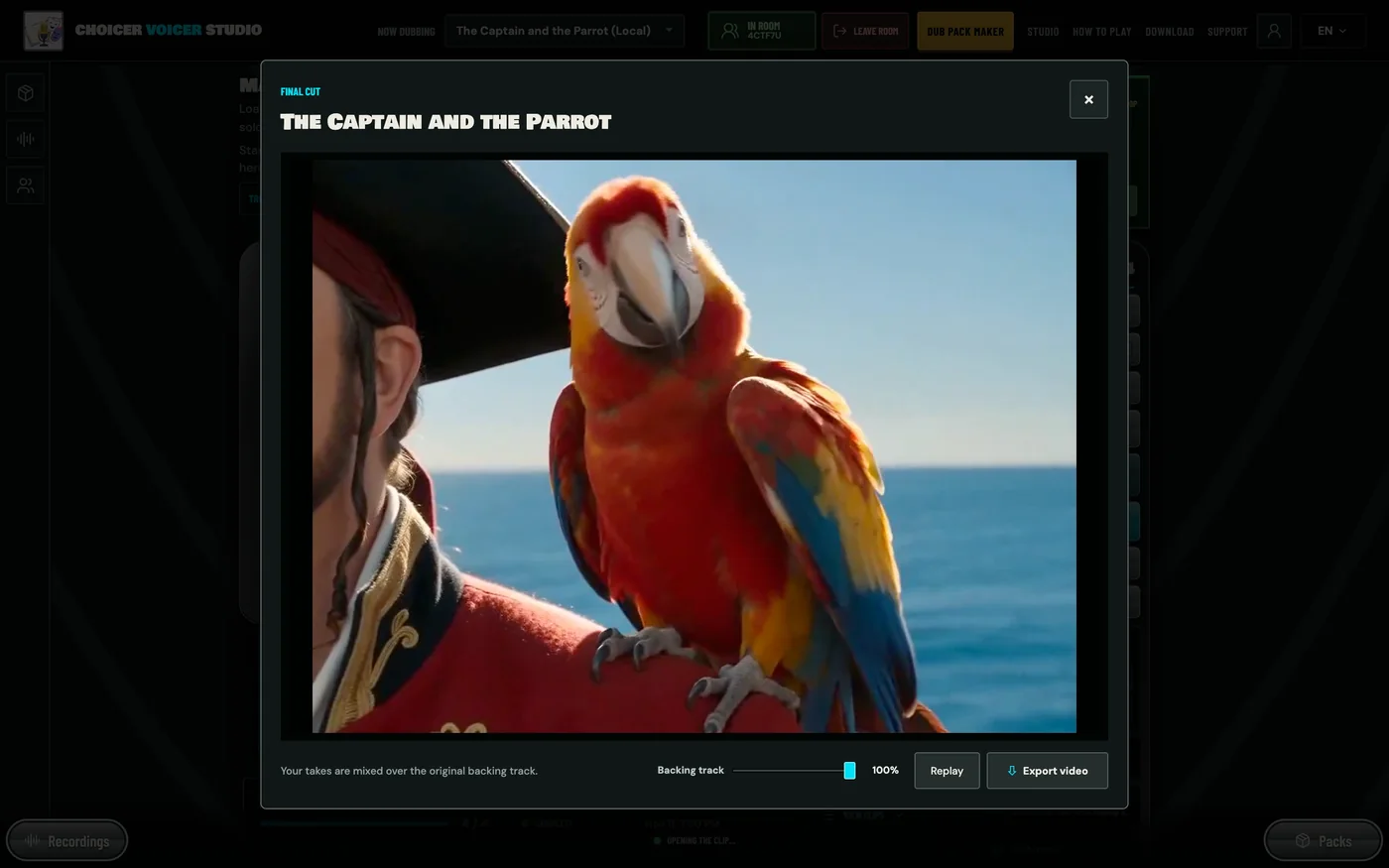
Every device builds the video locally from its own copy of the pack, so one person exporting is enough. The dub is also kept on your device: open Rooms, find the room and press Recordings to watch it again.
Choicer Voicer multiplayer at a glance
| Players | 2 or more. Every character in the pack needs a player, and one player can take several characters. |
|---|---|
| Price | Free. Joining a room is always free, and a free account can host one room a day. |
| Devices | A current browser on a computer or phone. Each player uses their own device and microphone. |
| Voice pack | Everyone imports the same pack ZIP. The ZIP itself is never uploaded. |
| Invites | A six-character room code, or an invite link that fills the code in. |
| Room lifetime | 24 hours. |
| Style | Co-op. Nobody wins. The scene is done when every line has a take. |
How to rejoin a room
Closed the tab, lost your connection or switched from phone to laptop? Nothing is lost. Either open the invite link again while signed in to the same account, or open Rooms in the Studio and press Continue. You come back as the same player, with the same role and the takes you already shared.
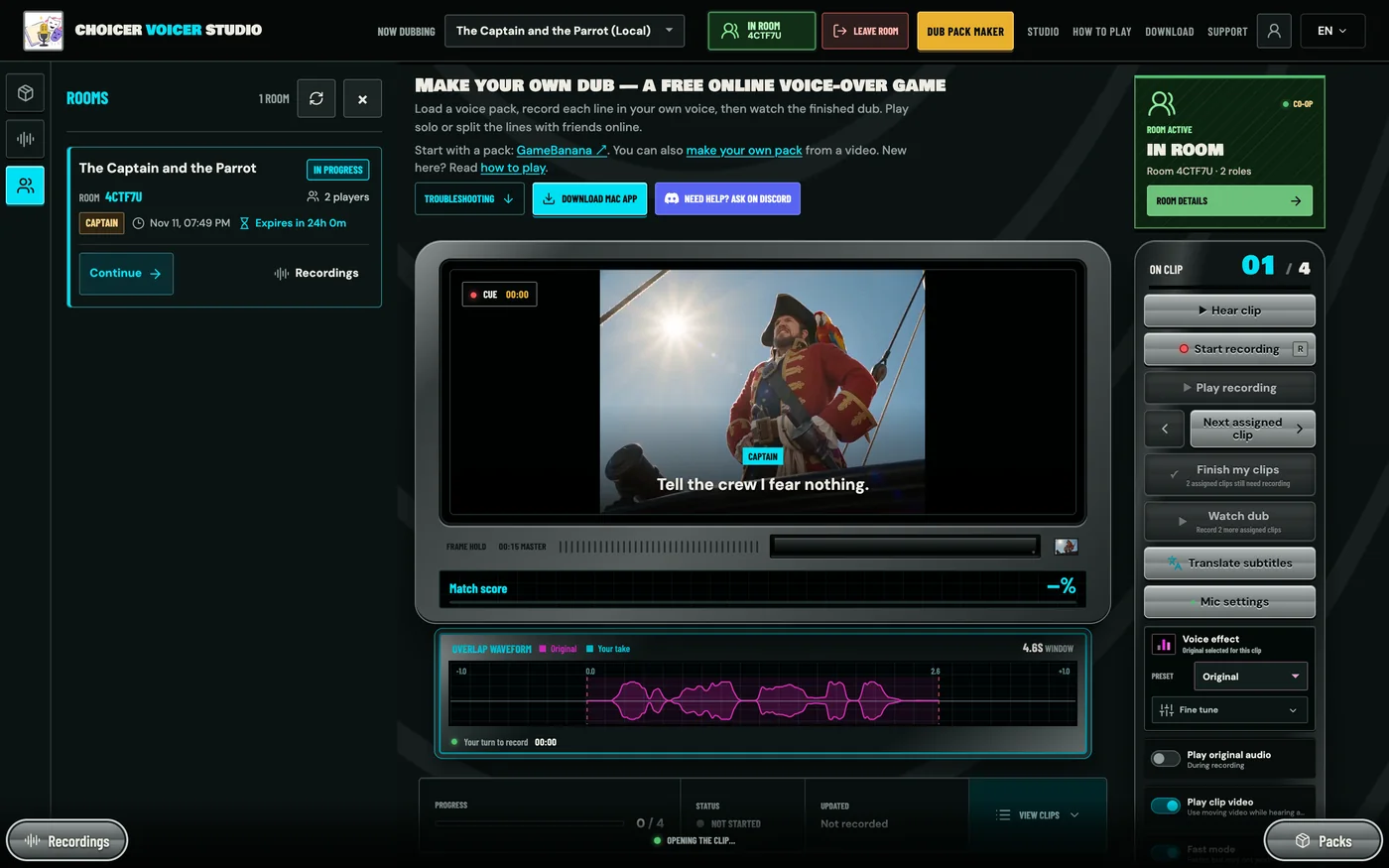
Rooms lists every room you have created or joined, with its status and the time left before it expires. While you are in a room, Room details on the green card reopens the room dialog, and Leave room in the top bar takes you out. If you leave during a game, your role opens up again so someone else can join and take it.
How many players can play Choicer Voicer multiplayer?
The pack sets the number. Every role needs a player before the host can start, and one player can hold several roles. A two-character scene needs exactly two players. A six-character scene can be played by six people, or by three people taking two roles each. A pack can have up to 100 roles and 2,000 clips.
Playing alone? You do not need a room. In solo mode, load the pack and record every line yourself, or use Choose roles to voice only some of the characters.
Is Choicer Voicer multiplayer free?
Yes. You can play multiplayer without paying anything:
- Joining a room is free, as many times as you like.
- Hosting is free too, one room a day.
- Solo recording is free and unlimited, with no account at all.
The free room resets every day at 00:00 UTC. A room only counts once its dub has been completed, so a room you opened and abandoned does not use up your day. If your group wants more than one room in a day, take turns hosting. The host can also upgrade to Multiplayer Pro on the pricing page.
What the room shares, and what stays on your device
Stays on your device
The pack ZIP, its video, images, original dialogue and backing track.
Shared with the room
Your player name, your roles, your progress and the voice takes you record.
Deleted automatically
Room recordings are removed from the server within 24 hours of upload, or sooner when the room closes.
Other players receive your takes and can export the dub while the room is open, and copies they have saved are theirs to keep. Play with people you trust, and do not say anything private into a take.
Troubleshooting Choicer Voicer multiplayer
"Pack ZIP needed" when joining a room
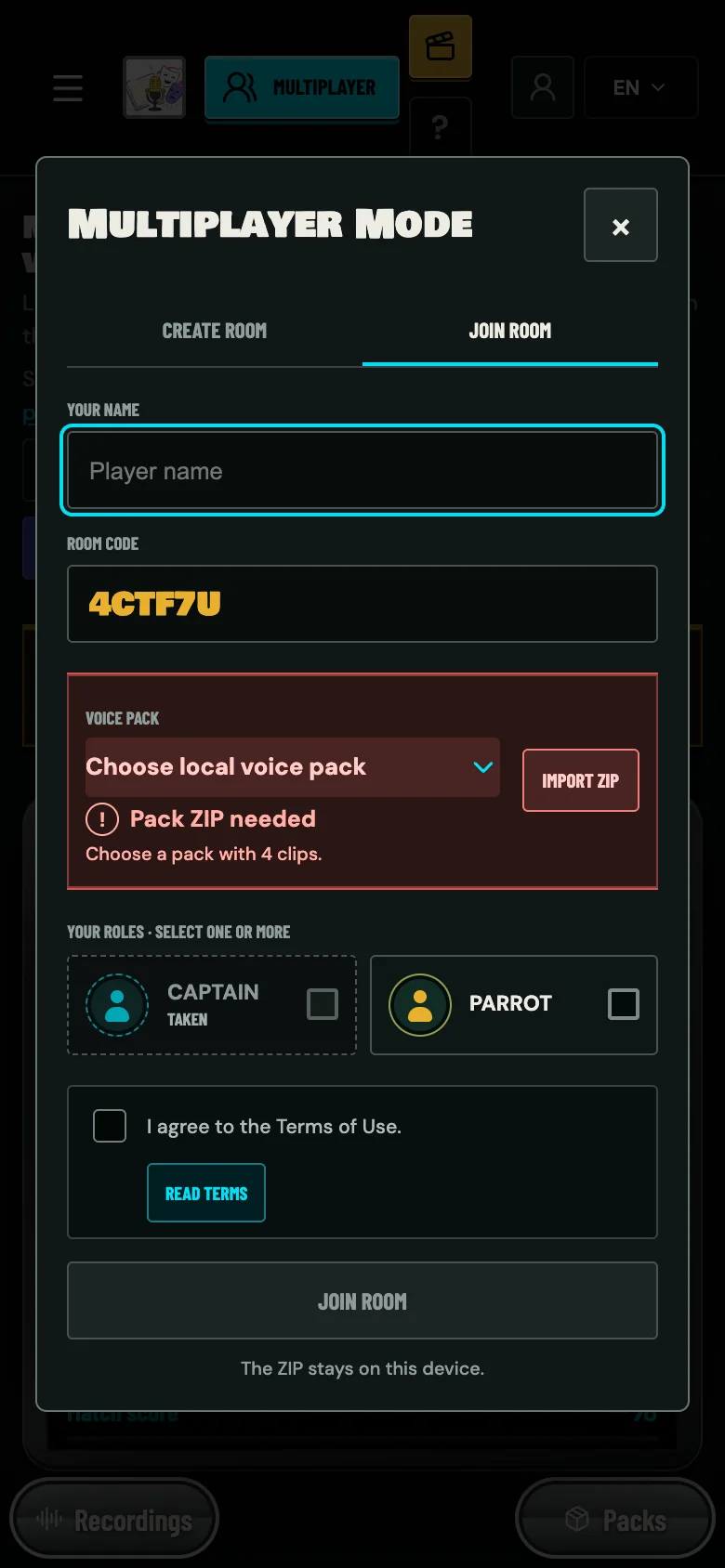
The pack is not on this device yet, or the one you picked has a different number of clips. Ask the host for the ZIP they used, press Import ZIP, and the warning clears. The message tells you the count the room expects, for example Choose a pack with 4 clips. A different edit of the same scene can have the same count and still get in, but its lines and timing will not match, so always use the host's file.
The Start game button is greyed out
Every role needs a player and every player needs to be ready. Read the status line at the top of the room: it says how many roles are still open. If someone's Ready to play button is greyed out, their pack does not match the room, and they should import the host's ZIP.
"Daily room limit reached"
You have used today's free room. Joining is still free, so let a friend host this one, or wait for the reset at 00:00 UTC.
"That room could not be found" or "This room is no longer available"
Check the code for typos first. Room codes never contain 0, 1, I or O, so a character that looks like one of those is something else. If the code is right, the room has expired or everyone left before the game started. Ask the host for a new invite link.
"Every role in this room already has a player"
The room is full. The host can remove a player from the Actions menu to free a role, or a player holding several roles can leave and join again with fewer.
Watch dub never appears, or a player shows as not finished
A take has not finished uploading, usually because of a weak connection. That player should keep the room open, record the clip again and press Finish my clips once more. Watch dub unlocks when every take has synced.
The microphone does not record
Allow the microphone for thechoicervoicer.app in your browser's site settings, then reload. Use Mic settings to pick the right input and check the level. On a phone, a normal browser tab works better than an in-app browser.
Choicer Voicer multiplayer FAQ
Does everyone need the voice pack?
Yes. Each player imports the same pack ZIP on their own device. The room does not send the pack to anyone, so the host shares the file before the game.
Can I play Choicer Voicer multiplayer on my phone?
Yes. Rooms work in the phone browser on iPhone and Android, and phone and computer players can share a room. See how to play Choicer Voicer on mobile.
How long does a room stay open?
24 hours. The clock restarts when the host starts the game, and the room stays alive while people are playing in it.
Can one player voice more than one character?
Yes. Tick several roles when you create or join the room.
Can I rejoin if I get disconnected?
Yes. Open the invite link again, or open Rooms and press Continue, signed in to the same account. Your role and shared takes are kept.
Does Choicer Voicer have voice chat?
No. Rooms only sync roles, progress and recordings. Use your usual call or group chat alongside, and wear headphones so the call does not end up in your take.
Do we have to record at the same time?
No. Everyone works through their own lines at their own pace. The dub is ready when the last player finishes, as long as that happens before the room expires.
More Choicer Voicer guides
- How to create a Choicer Voicer dub pack from your own video.
- How to play Choicer Voicer on mobile.
- 3 online dubbing and voice party games to play with friends.
- Voice Over Game: what Choicer Voicer is and how solo mode works.
Open Choicer Voicer, create a room and send the link to one friend. A two-character scene takes about ten minutes.